 Mark-up Languages
Note: We will go back and forth between lectures on (X)HTML and Dreamweaver for the next 4 classes
Introduction to (X)HTML
The building blocks of the Web (L019)
In Lecture 12 we discussed the layout of a typical Web Page, and what the user sees when they open a document: Headings/Banners, Top/Left/Right/Bottom Navigation, Content , Footing, etc. So now, lets talk about how a document is actually built.
Mark-up Languages
A markup language is an agreed upon construct for a set of instructions that describe how a document is to be displayed in a specific medium. It requires a system for annotating text in such a way that it is syntactically distinguishable from that displayable text.
This annotation or formatting must be built upon existing and widely adopted standards that is
machine parsable.
Historically, markup was a process of "marking up" a manuscript with the printers instructions for typesetting: setting type, fonts, sizes, spacing, and indentation.
Our contemporary use of the term markup refers to the internal, (mostly invisible code) in electronic documents. Markup can be:
There are numerous markup languages:
to name a few. But there are many other markup languages such as Handheld Device Markup Language (HDML), Wireless Markup Language (WML), Mathematical Markup Language (MathML),Chemical Markup Language (CML), and even Rich Text Format (RTF) if you take the definition outside the web.
Technically speaking a markup language must specify
To do this, markup languages rely upon a "Document Type Definition" (DTD). A stand-alone document/file that defines the specifications (the allowed syntax) of the markup language being used.
In the beginning there was SGML...
SGML was perhaps the earliest true markup language from which all others were derived. It was developed in the 1960s, but it was just too bulky for efficient web design and development.
HTML was the answer to the bloated SGML.
In 1980, physicist Tim Berners-Lee, proposed and prototyped a system for sharing documents. His work became publicly available as HTML in 1991. It contained 20 elements (Thirteen of these elements still exist). From 1991 to 1997 HTML went through 4 versions (up to HTLM v.4.0)
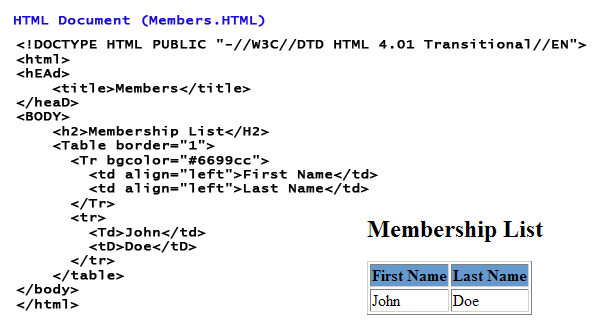
Since 1996, HTML specifications have been maintained by the World Wide Web Consortium -W3C (with input from commercial software vendors - Netscape, Microsoft, Sun, Firefox, IBM...). W3C also maintains the XML, and XHTML specifications.
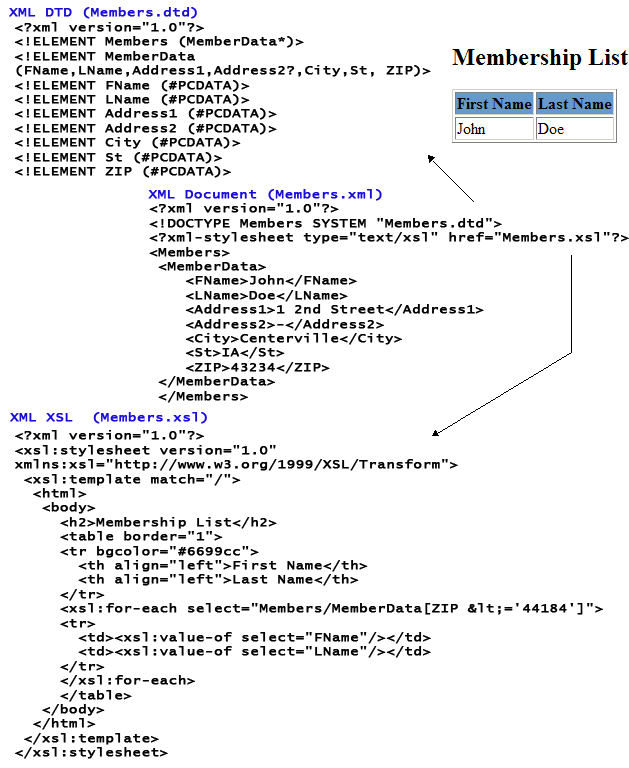
XML became a W3C Recommendation in February 1998. XML is a standard for describing data. It is extremely powerful when used to define data elements and describe data.
XHTML is an application of XML using a restrictive subset of SGML. Although similar to HTML, XHTML documents need to be well-formed; meaning that rules really matter... and this was a major departure from the loose standards of HTML.
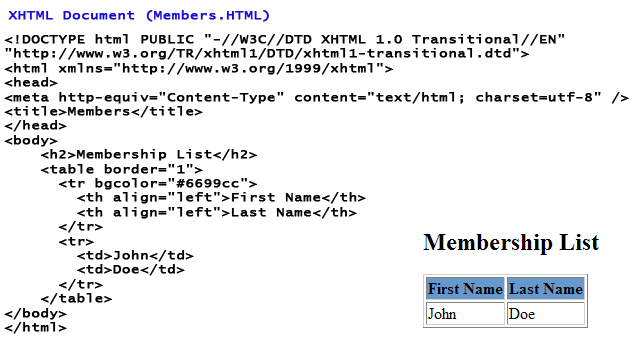
In January 2000, XHTML was introduced as a separate language intended to reformulate HTML 4.01 using XML 1.0.
Both HTML v.5 and XHTML v.2 are competing to replace HTML v.4.
Generally speaking: HTML displays data, XML describes data, and XHTML tries to do both...
So what's next?
What is the future of (X)HTML?
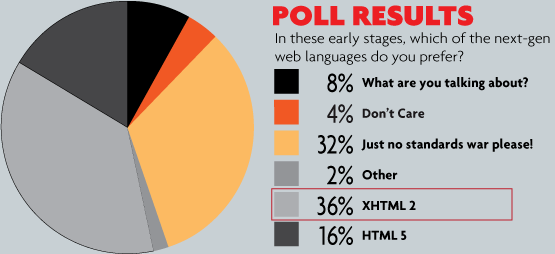 What may seem funny is that in a poll conducted in 2008, By Chris Coyier of css-tricks.com, developers by more than 2-to-1 preferred XHTML2 over HTML5.
Go Figure...
Associated Reading: Castro, pp. 14-19,.
What's a DTD - Document Type Definition
A DTD (Document Type Definition) is a set of markup declarations that define a document type for any SGML-family of markup languages
(SGML, XML, HTML).
Not to be confused with a Document Type Declaration (DOCTYPE), which instructs a particular SGML/HTML or XML document (i.e., a web page) to associate markup with a Document Type Definition (DTD).
A DTD looks like this:
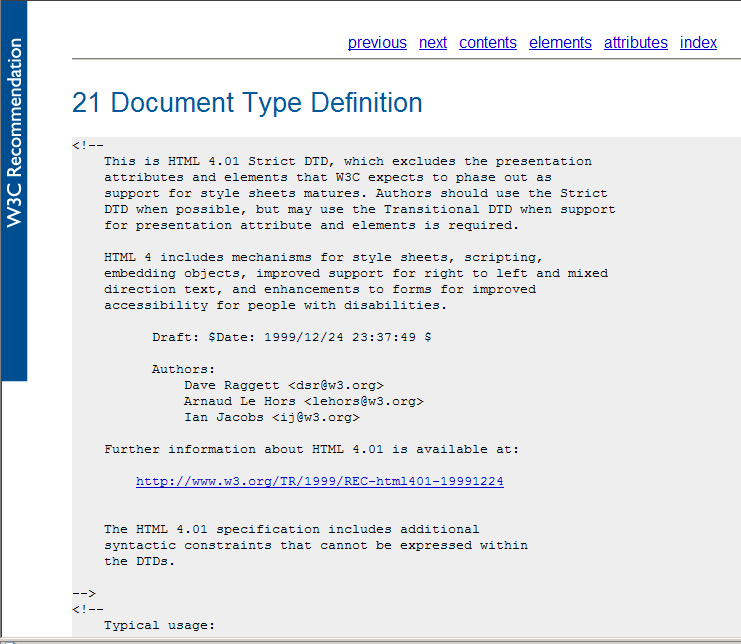
DTD_HTML4_WC3.gif ( www.w3.org/TR/html4/sgml/dtd.html )
Ok... So what's a DOCTYPE (Document Type Declaration)
The DOCTYPE is an instruction that associates a web page with a DTD.
The DOCTYPE isn't exactly an HTML or XHTML tag element. Its a declaration.
This instruction is found at the top of the document. It is a declaration that is independent of the main Head and Body elements of the page. Whether developing with HTML or XHTML, the developer has the ability to choose between 3 variations of a DOCTYPE: Strict, Transitional, and Frameset. (We are not going to look at Framesets in this discussion)
The DOCTYPE is generally the first line of code in a Web page. It contains a list of information that helps a browser interpret the markup on the page. If it is not included the Browser will determine what DTD to use. Below is a typical Web Page DOCTYPE
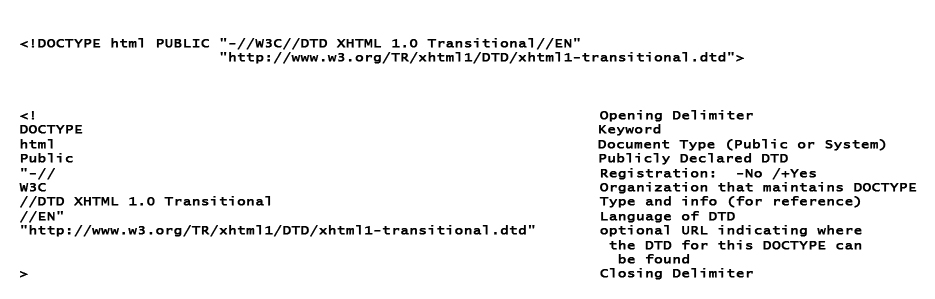
DOCTYPE_Defined.jpg
Here is the DOCTYPE for this page:
<!DOCTYPE html PUBLIC "-//W3C//DTD XHTML 1.0 Transitional//EN"
"http://www.w3.org/TR/xhtml1/DTD/xhtml1-transitional.dtd">
The above example is for XHTML and is Transitional.
Regardless of whether you choose to use XHTML or HTML, you need to specify the level of precision you want in your document. There are two flavors of DTD precision: Strict and Transitional. Both names are self explanatory, but it is important to recognize that both standards are cross-browser compatible. However, it is safe to say that you should become as strict as possible in your coding.
W3C provides a validation tool for testing your code for compliance: http://validator.w3.org/
Strict
Transitional
Allows legacy markup standards, including deprecated elements or attributes.
deprecated elements (examples): center, font, iframe, strike, u
deprecated attributes (examples):
- align (allowed on table elements: col, colgroup, tbody, td, tfoot, th, thead, and tr)
- language
- background
- bgcolor
- border (allowed on table)
- height (allowed on img and object)
- hspace
- noshade
- nowrap
- target
- text
- link
- vlink
- alink
- vspace
- width (allowed only on img, object, table, col, and colgroup)
Associated Reading: Castro, pp. 40-41,57.
DOCTYPE Examples (not including Frameset)
What happens if you don't use a DOCTYPE specification?
The browser will simply rely upon its best default implementation (albeit incomplete or incorrect). This is refered to as "Quirks Mode" and is generally in place to allow for backwards compatibility so that older web pages (without standard DOCTYPEs) to display.
Using a DOCTYPE is definitely Best Practice, and anytime you do not include one you are asking for trouble.